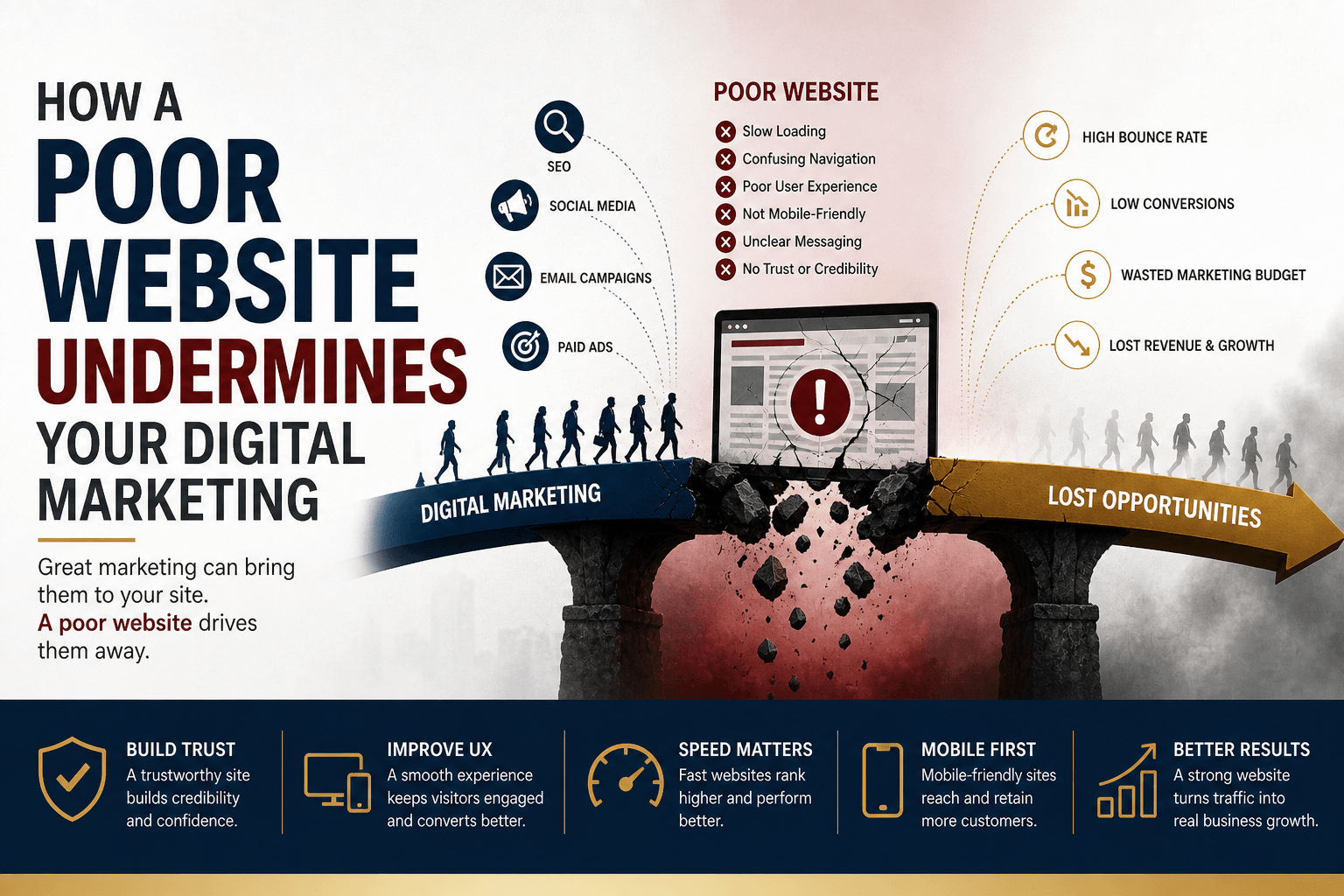
Your marketing campaigns can drive thousands of visitors to your website, but if your site doesn’t provide a great experience, those visitors won’t stick around. A slow, outdated, or confusing website can quickly undo the hard work and budget you’ve invested in SEO, social media, email marketing, and paid advertising.
Think of your website as your digital storefront. It should welcome visitors, answer their questions, build confidence, and guide them toward taking action. If it doesn’t, even the best marketing strategy will struggle to generate results.
These five website mistakes might be preventing visitors from becoming customers. Learn what they are and how to address them effectively.
1. Slow Load Speed
In today’s fast-paced digital world, people expect websites to load almost instantly. If your pages take more than a few seconds to appear, many visitors will leave before they’ve even seen your content.
A slow website doesn’t just frustrate users; it also affects your search engine rankings and the performance of your paid advertising campaigns. Search engines and advertising platforms reward fast, responsive websites because they provide a better user experience.
Why it matters
- Increases bounce rates
- Reduces conversions
- Hurts SEO performance
- Lowers paid ad quality scores
How to improve it
- Compress and optimize images.
- Enable browser caching.
- Minify CSS and JavaScript files.
- Test your site regularly using tools like Google PageSpeed Insights.
Goal: Aim for page load time of under 2 seconds whenever possible.
2. Poor User Experience (UX)
A website should make it easy for visitors to find information and complete their goals. If your pages are cluttered, difficult to navigate, or overloaded with pop-ups, visitors are more likely to leave without taking action.
Good user experience is about creating a clear, simple journey from the moment someone lands on your website to the moment they become a customer.
Why it matters
- Visitors become frustrated and leave quickly.
- Higher bounce rates reduce marketing effectiveness.
- Confusing layouts lower conversion rates.
How to improve it
- Keep page layouts clean and uncluttered.
- Focus each page on one primary objective.
- Use plenty of white space for readability.
- Test your website with usability tools such as Hotjar or Microsoft Clarity to identify pain points.
3. Weak or Generic Website Copy
Your website copy should explain how you solve your customers’ problems, not simply list your products or services.
Visitors want to know what’s in it for them. Strong copy highlights benefits, builds excitement, and encourages people to take the next step.
Instead of saying:
“We provide business software.”
Try something like:
“Save hours every week by automating your business processes.”
The second example immediately communicates value.
Why it matter
- Better messaging increases conversions.
- Consistent messaging builds trust.
- Clear benefits help visitors make decisions faster.
How to improve it
- Focus on customer benefits instead of features.
- Write clear, action-oriented headlines.
- Match the messaging used in your ads and landing pages.
- Continuously A/B test headlines, calls-to-action, and page content
4. Confusing Navigation
Even the best content won’t help if visitors can’t find it. Complicated menus, hidden pages, or too many navigation options overwhelm users and make it difficult for them to complete important actions like requesting a quote or making a purchase. Your navigation should guide users, not confuse them.
Why it matters
- Visitors struggle to find important information.
- Customer journeys become longer and less effective.
- High traffic doesn’t translate into conversions.
How to improve it
- Include clear calls-to-action such as Get Started, Book a Demo, or Contact Us.
- Keep your main navigation simple.
- Limit menu items to the most important pages.
- Use descriptive labels that visitors immediately understand.
5. Missing Trust Signals
People are naturally cautious when interacting with a business online, especially if it’s their first visit. If your website doesn’t provide evidence that your business is trustworthy, many visitors will hesitate before making a purchase or submitting an enquiry.
Trust signals reassure potential customers that they’re making the right decision.
Why it matters
- Reduces purchase hesitation.
- Build confidence in your brand.
- Increases enquiries and sales.
How to improve it
- Customer reviews and testimonials
- Case studies and success stories
- Security badges and SSL certificates
- Money-back guarantees or warranties
- Clear contact information and business address
- Team photos and company information
These small additions can have a significant impact on conversion rates.
Impact Comparison Table
| Issue | Marketing Damage | Fix Priority |
| Slow Loading Speed | Higher bounce rates and lower search rankings | High |
| Poor User Experience | Visitors leave before converting | High |
| Weak Website Copy | Lower engagement and fewer conversions | Medium |
| Confusing Navigation | Users struggle to find important pages | Medium |
| Missing Trust Signals | Reduced customer confidence and fewer sales | High |
Final Thoughts
Your website plays a critical role in the success of every digital marketing campaign. While advertising, SEO, and social media can bring visitors to your site, it’s your website that determines whether those visitors become customers.
Start by improving the fundamentals (website speed, user experience, and trust signals) as these often deliver the biggest and fastest improvements. Then refine your messaging and navigation to create a seamless experience from the first click to the final conversion.
Remember, a successful marketing campaign doesn’t end when someone visits your website. That’s where the real opportunity begins. A fast, user-friendly, and trustworthy website can turn curious visitors into loyal customers and maximize the return on every marketing dollar you spend.